1. Set Constraint
1.2. Batch Constraints
You can set constraint for the batch at Batches List under the Data.

Diagram 1.2.1 Location of Batches List
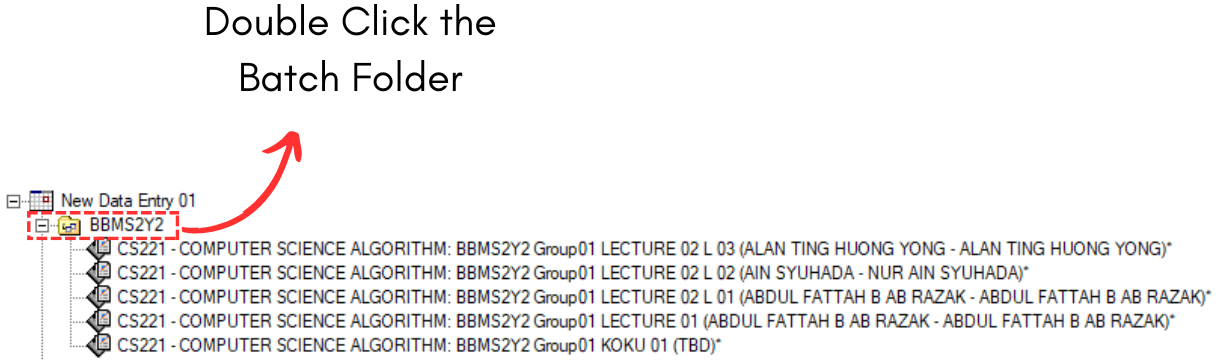
Diagram 1.2.1 Double Click the Constraints Folder
Batch Constraints Window will appear.
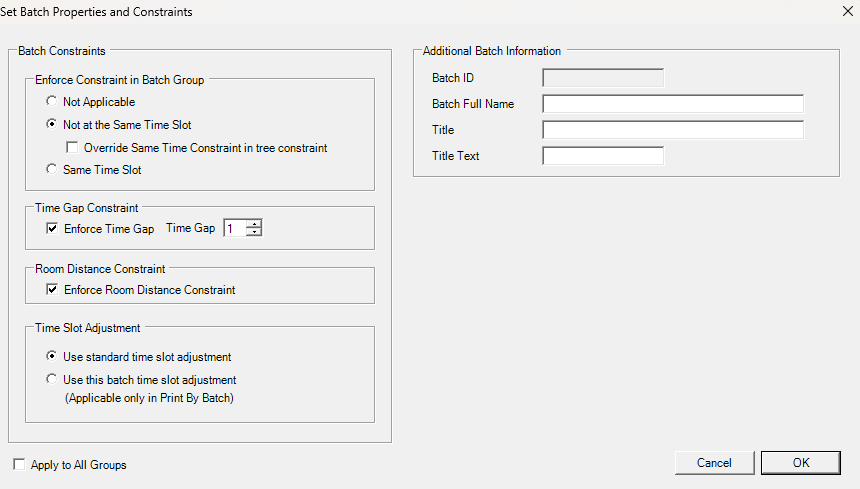
Refer to the table below to know on IMPORTANT constraint setting at group constraints.
|
Not at the Same Time Slot |
User normally set these constraints for courses that prefer to have the classes in different time slot. Example, 1st Batch and 2nd Batch prefer to be in different time slot. |
|
Time Gap Constraint |
User normally enforce time gap constraint to avoid overlapping between batches. |
|
Room Distance Constraints |
You can use this constraint setting if you want to consider the Room Distance Constraints between batches. |
Table 1.2.1 Important Constraints Settings Explanation