1. Set Constraint
1.1. Group Constraints
You can set constraints at the Data under Tree Structure. In Group Constraints, you can set constraints from Parent folder to child folder in which settings set at Parent will automatically inherit by the child folder.
To open Group Constraints, double click on a constraints folder under the tree structure.
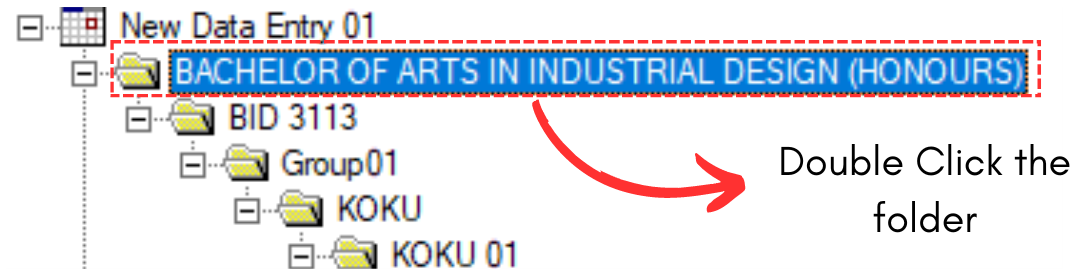
Diagram 1.1.1 Double Click the Constraints Folder
Set Constraints Window will appear.
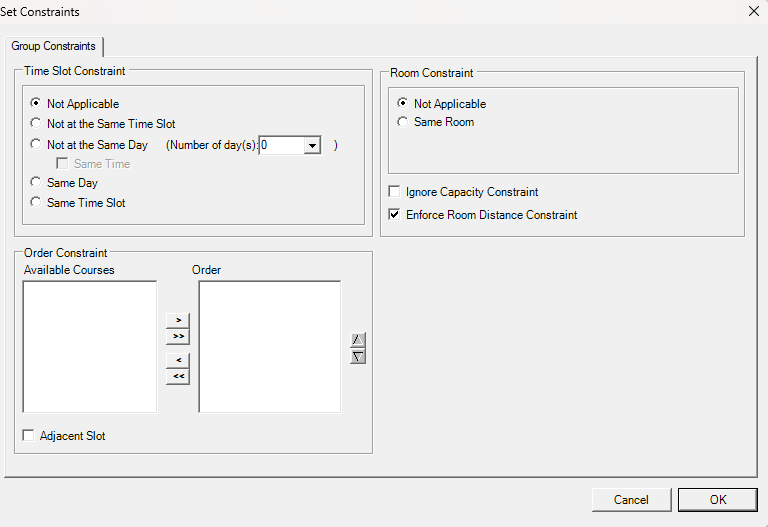
Diagram 1.1.2 Group Constraints Window
Refer to the table below to know on IMPORTANT constraint setting at group constraints.
|
Not at the Same Day |
User normally set these constraints for courses that prefer to have the classes in different days. Example, 1st Lecture and 2nd Lecture prefer to be in different days. |
|
Same Time + Same Room + Ignore Capacity Constraint |
User normally check these 3 settings for team teaching. Alternatively, user can set team teaching at Merge Group. |
|
Same Room |
You can use this constraint setting if group of courses prefer to be slotted into same room (Parent). |
Table 1.1.1 Important Constraints Settings Explanation