1. Setting Up Timetable Structure
1.3. Time Slot Adjustment
 Diagram 1.3.1 Location of the Time Slot Adjustment
Click Time Structure and the Click Time Slot Adjustment to adjust time slot in timetable output.
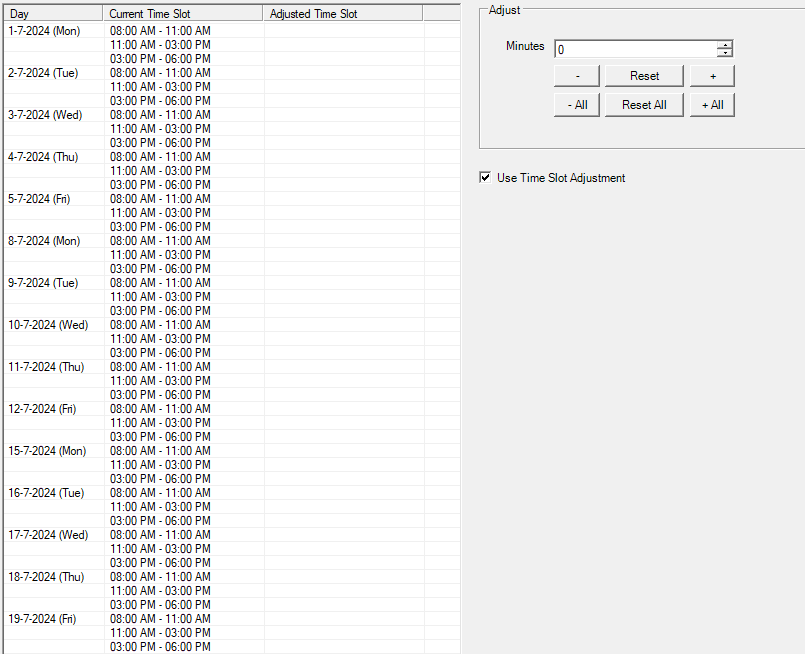
Diagram 1.3.2 Time Slot Adjustment
Step by Step on how to input Time Slot Adjustment:
Step 1: Click on the particular slot (Example 1-7-2024 Monday 08.00 AM- 1100 AM)
Step 2: Go to Adjust column and input the X Minutes to adjust (Example 30 Minutes)
Step 3: Click either  or
or 
(If press then the adjusted time is 0830 -0930)
Step 4: Check the box Use Time Slot Adjustment if all Batch of Students and Lecturers are going to use this time slot adjustment.
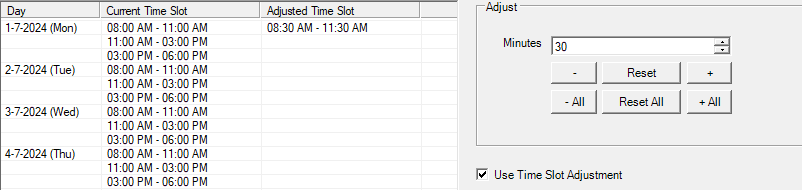
Diagram 1.3.3 Time Slot Adjusted On Monday
Above is the example after the time slot has been adjusted on Monday.